Budget and forecast variance

Learn how to effectively analyze budget vs. forecast variance using thinkcell charts

rate limit

Code not recognized.

About this course

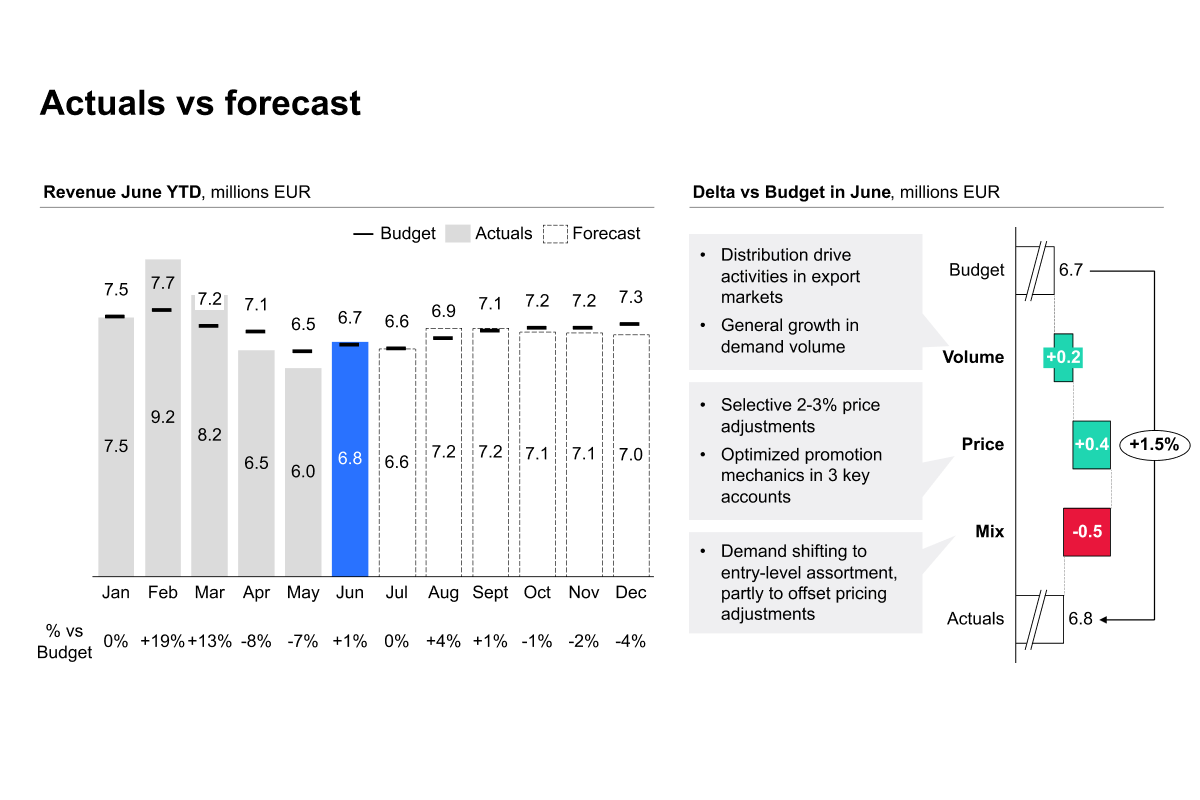
Create clear and insightful budget vs. actuals slides using thinkcell to visualize performance, variances, and forecasts. Learn how to combine charts, tables, and formatting techniques to communicate financial results effectively.

  • Combination charts: Combine actuals, forecasts, and budgets in a single chart to clearly compare financial performance.
  • Variance analysis: Create aligned percentage variance tables and apply conditional formatting to highlight important differences between actuals and targets.
  • Waterfall charts: Break down key variances and visualize the factors driving performance, such as volume, price, or product.
  • Financial storytelling: Bring charts and supporting data together to create clear, structured, and executive-ready financial presentations.


Curriculum23 min

  • Introduction & key concepts
  • Introduction & key concepts 5 min
  • Creating the slide visuals
  • Creating the slide visuals pt. 1 2 min
  • Creating the slide visuals pt. 2 1 min
  • Building the charts
  • Building the stacked chart 4 min
  • Designing the data table 3 min
  • Crafting the waterfall chart & adding callouts 4 min
  • Final overview
  • Final overview 2 min
  • Completion
  • budget and forecast variance quiz 2 min
  • Share your feedback
  • Complete course 1 min

About this course

Create clear and insightful budget vs. actuals slides using thinkcell to visualize performance, variances, and forecasts. Learn how to combine charts, tables, and formatting techniques to communicate financial results effectively.

  • Combination charts: Combine actuals, forecasts, and budgets in a single chart to clearly compare financial performance.
  • Variance analysis: Create aligned percentage variance tables and apply conditional formatting to highlight important differences between actuals and targets.
  • Waterfall charts: Break down key variances and visualize the factors driving performance, such as volume, price, or product.
  • Financial storytelling: Bring charts and supporting data together to create clear, structured, and executive-ready financial presentations.


Curriculum23 min

  • Introduction & key concepts
  • Introduction & key concepts 5 min
  • Creating the slide visuals
  • Creating the slide visuals pt. 1 2 min
  • Creating the slide visuals pt. 2 1 min
  • Building the charts
  • Building the stacked chart 4 min
  • Designing the data table 3 min
  • Crafting the waterfall chart & adding callouts 4 min
  • Final overview
  • Final overview 2 min
  • Completion
  • budget and forecast variance quiz 2 min
  • Share your feedback
  • Complete course 1 min