- Introduction & key concepts
-
Download: PowerPoint and Excel file
-
Introduction 1 min
- Building the chart
-
Adding the chart and category labels 3 min
-
Adding the values and labels 2 min
-
Changing the theme and adding a legend 3 min
-
Adding a target EBITDA 3 min
-
Adding a level difference arrow 3 min
-
Linking EBITDA uplift to the action title 2 min
- Completion
-
Complete course 1 min

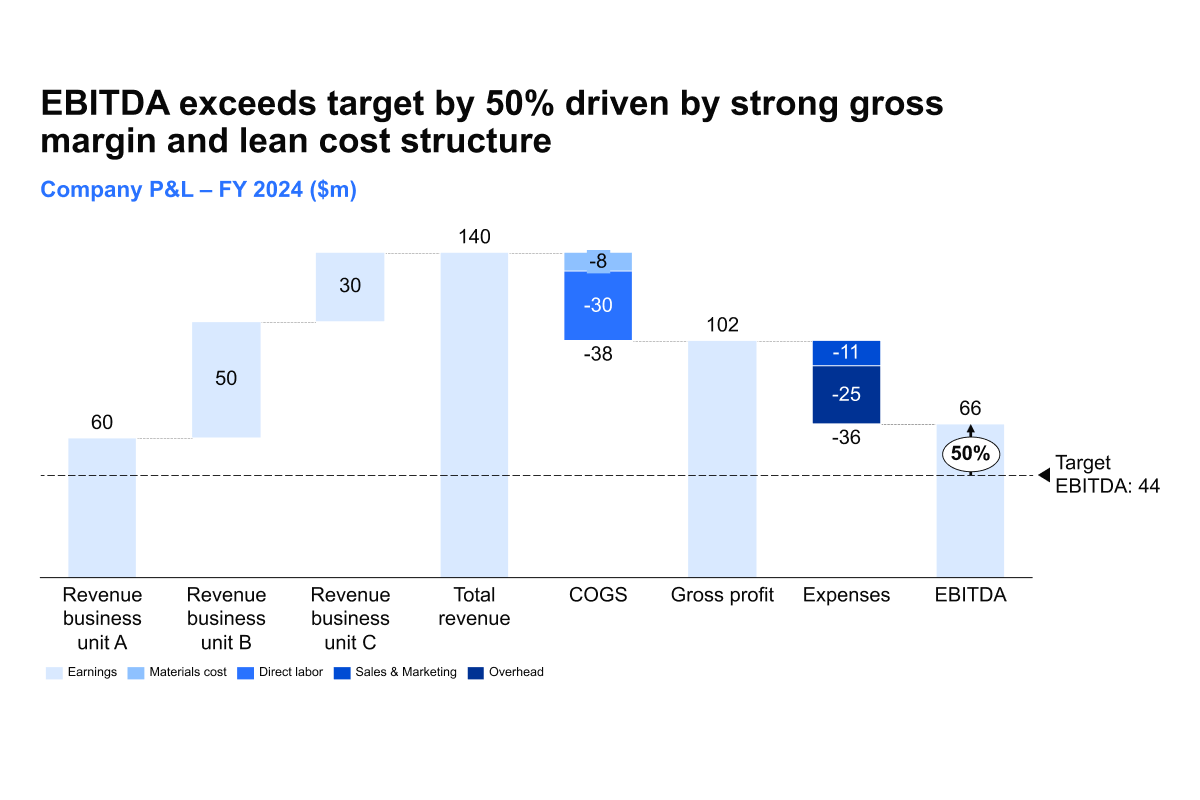
Create a P&L chart
Learn how to create a P&L chart
By the end of this course, you will be able to create a P&L chart that highlights financial performance and clearly communicates the drivers of EBITDA.
A P&L (profit and loss) statement summarizes a company’s revenues, costs, and expenses over a given period, showing whether the business is profitable or not.
- Building the chart structure: Learn how to insert a P&L chart, add category labels, and include values and labels to establish the foundation of your analysis.
- Enhancing readability: Apply the right theme, add a legend, and use a level difference arrow to show changes clearly while positioning the chart for maximum impact.
- Highlighting EBITDA performance: Add a target EBITDA line, represent negative values correctly, and link the EBITDA uplift directly to the action title for clear storytelling.
These techniques will help you present financial results in a way that is both analytically precise and visually compelling.