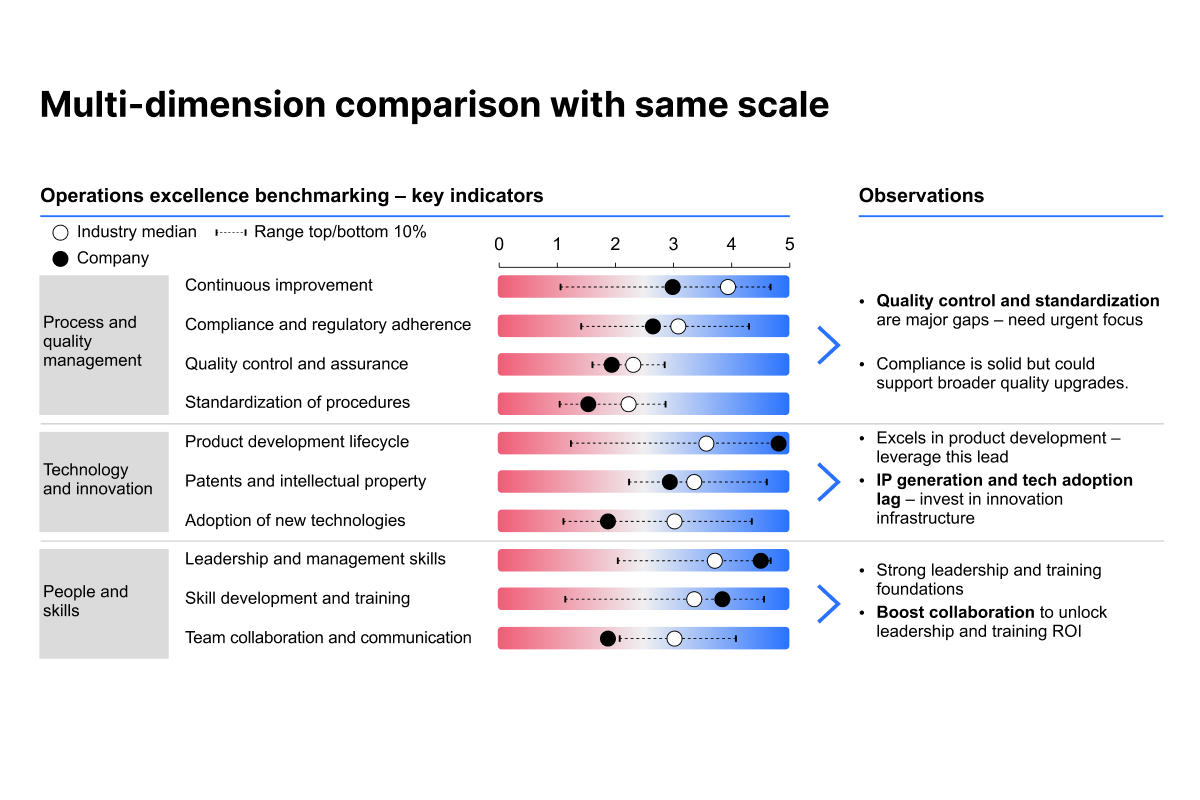
Multi-variable comparison with same scale

Learn how to compare multiple dimensions on the same scale

rate limit

Code not recognized.

About this course

By the end of this course, you’ll be equipped to build professional profile charts in thinkcell, enabling you to compare company performance against industry benchmarks with clear markers, ranges, and scalable formatting.

  • Clarity through grouping: Learn how to organize multiple benchmarking dimensions into logical groups, sort them by company performance, and use horizontal separators to guide interpretation.
  • Insightful storytelling with commentary: Add text boxes alongside your charts to capture key observations, highlight strengths and weaknesses, and provide executives with context that numbers alone cannot convey.
  • Polished visual presentation: Refine your slides by removing unnecessary baselines, building clean legends, and aligning group labels for consistency and readability.

These techniques will help you turn complex benchmarking data into slides that are not only analytically robust but also visually coherent and executive friendly.


Curriculum26 min

  • Introduction & key concepts
  • Introduction & chart explanation 3 min
  • Chart example and walkthrough 3 min
  • Creating the slide visuals
  • Building the profile chart 6 min
  • Adding comments and a legend 5 min
  • Adding a gradient 4 min
  • Completion
  • Multi-variable comparison quiz 2 min
  • Share your feedback
  • Complete course 1 min

About this course

By the end of this course, you’ll be equipped to build professional profile charts in thinkcell, enabling you to compare company performance against industry benchmarks with clear markers, ranges, and scalable formatting.

  • Clarity through grouping: Learn how to organize multiple benchmarking dimensions into logical groups, sort them by company performance, and use horizontal separators to guide interpretation.
  • Insightful storytelling with commentary: Add text boxes alongside your charts to capture key observations, highlight strengths and weaknesses, and provide executives with context that numbers alone cannot convey.
  • Polished visual presentation: Refine your slides by removing unnecessary baselines, building clean legends, and aligning group labels for consistency and readability.

These techniques will help you turn complex benchmarking data into slides that are not only analytically robust but also visually coherent and executive friendly.


Curriculum26 min

  • Introduction & key concepts
  • Introduction & chart explanation 3 min
  • Chart example and walkthrough 3 min
  • Creating the slide visuals
  • Building the profile chart 6 min
  • Adding comments and a legend 5 min
  • Adding a gradient 4 min
  • Completion
  • Multi-variable comparison quiz 2 min
  • Share your feedback
  • Complete course 1 min