
- Introduction & key concepts
-
Download: PowerPoint and Excel file
-
Introduction 1 min
- Building the Combination chart
-
Inserting the data 3 min
-
Set to right axis 3 min
-
Finetuning 5 min
- Completion
-
Complete course 1 min
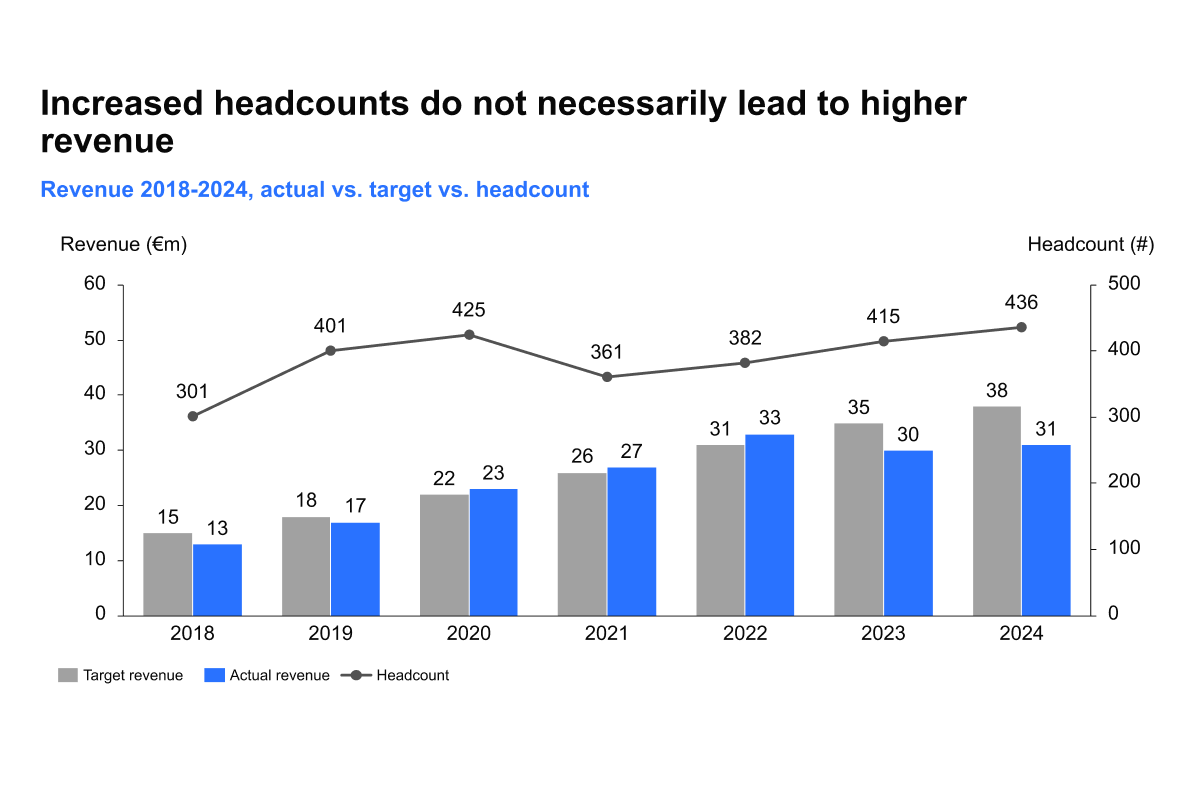
Compare revenue to headcount
Course 4 of 7 in Financial Planning
Learn how to compare revenue to headcount
By the end of this course, you will be able to compare revenue to headcount by building a combination chart that is accurate and well-structured.
- Setting up the data correctly: Learn how to insert your data, assign revenue and headcount to the appropriate axes, and ensure the chart reflects the right comparisons.
- Highlighting the right insights: Understand how to emphasize the relationship between revenue and headcount, making it easier to spot trends, imbalances, or efficiencies.
- Refining the final chart: Fine-tune the formatting, adjust scales for readability, and apply clean design practices to produce a professional, executive friendly slide.
These techniques will help you transform raw data into a chart that not only shows numbers but also tells a clear and compelling story.