Compare development

Course 2 of 6 in Project Management

Learn how to effectively compare development with thinkcell column charts

rate limit

Code not recognized.

About this course

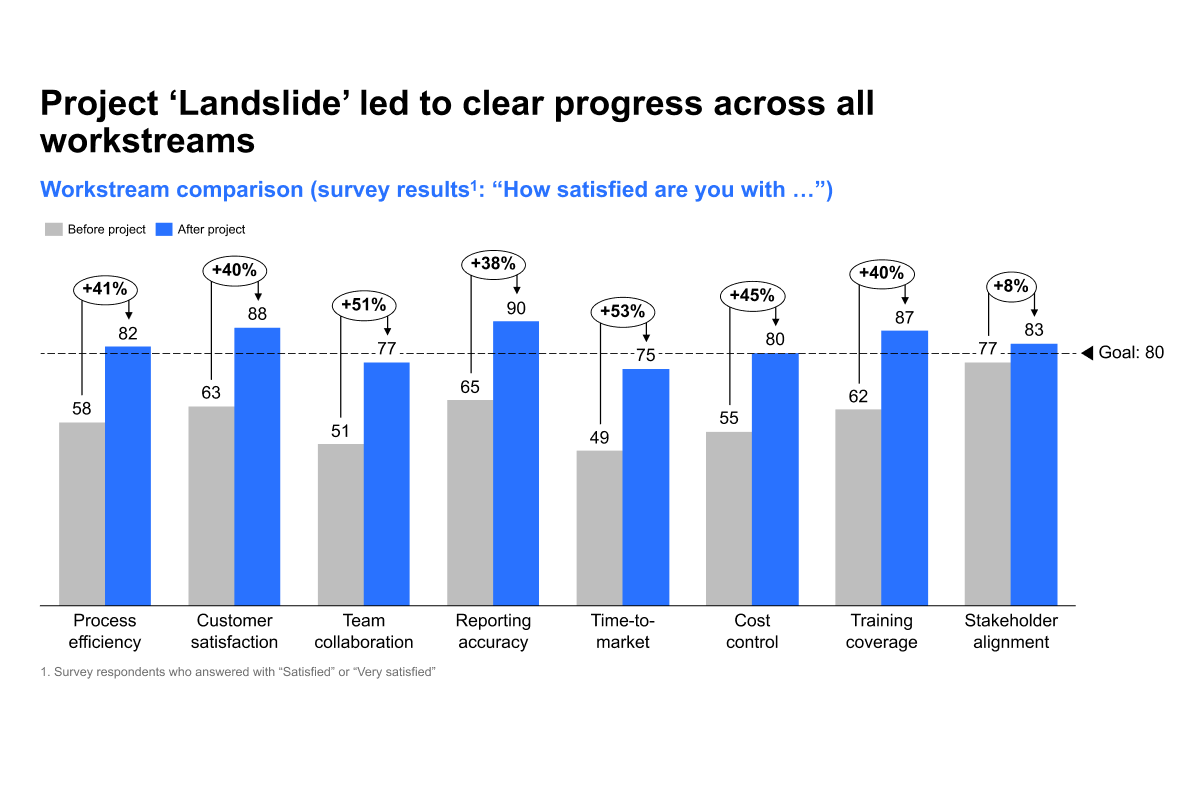
By the end of this course, you'll be equipped to effectively compare development across categories by building a clean, insightful clustered column chart with total difference arrows.

  • Chart ready data structuring: Learn how to transpose data in Excel and remove 100% column if unnecessary.
  • Clear visual comparison: Build a clustered column chart that highlights category differences and quickly add total difference arrows to show key changes at a glance.
  • Goal tracking and updates: Add a value line to emphasize targets or benchmarks and explore manual chart updates and best practices to keep your visuals sharp and presentation ready.

These skills will help you turn raw data into compelling comparisons that are easy to understand and ideal for communicating progress, performance, and goals.


Curriculum17 min

  • Introduction & key concepts
  • Download: PowerPoint and Excel files
  • Introduction and editing the data sheet 6 min
  • Chart best practices 5 min
  • Adding total difference arrows and value line 5 min
  • Completion
  • Complete course 1 min

About this course

By the end of this course, you'll be equipped to effectively compare development across categories by building a clean, insightful clustered column chart with total difference arrows.

  • Chart ready data structuring: Learn how to transpose data in Excel and remove 100% column if unnecessary.
  • Clear visual comparison: Build a clustered column chart that highlights category differences and quickly add total difference arrows to show key changes at a glance.
  • Goal tracking and updates: Add a value line to emphasize targets or benchmarks and explore manual chart updates and best practices to keep your visuals sharp and presentation ready.

These skills will help you turn raw data into compelling comparisons that are easy to understand and ideal for communicating progress, performance, and goals.


Curriculum17 min

  • Introduction & key concepts
  • Download: PowerPoint and Excel files
  • Introduction and editing the data sheet 6 min
  • Chart best practices 5 min
  • Adding total difference arrows and value line 5 min
  • Completion
  • Complete course 1 min