Show project cost overview

Course 3 of 6 in Project Management

Learn how to effectively track project cost overview

rate limit

Code not recognized.

About this course

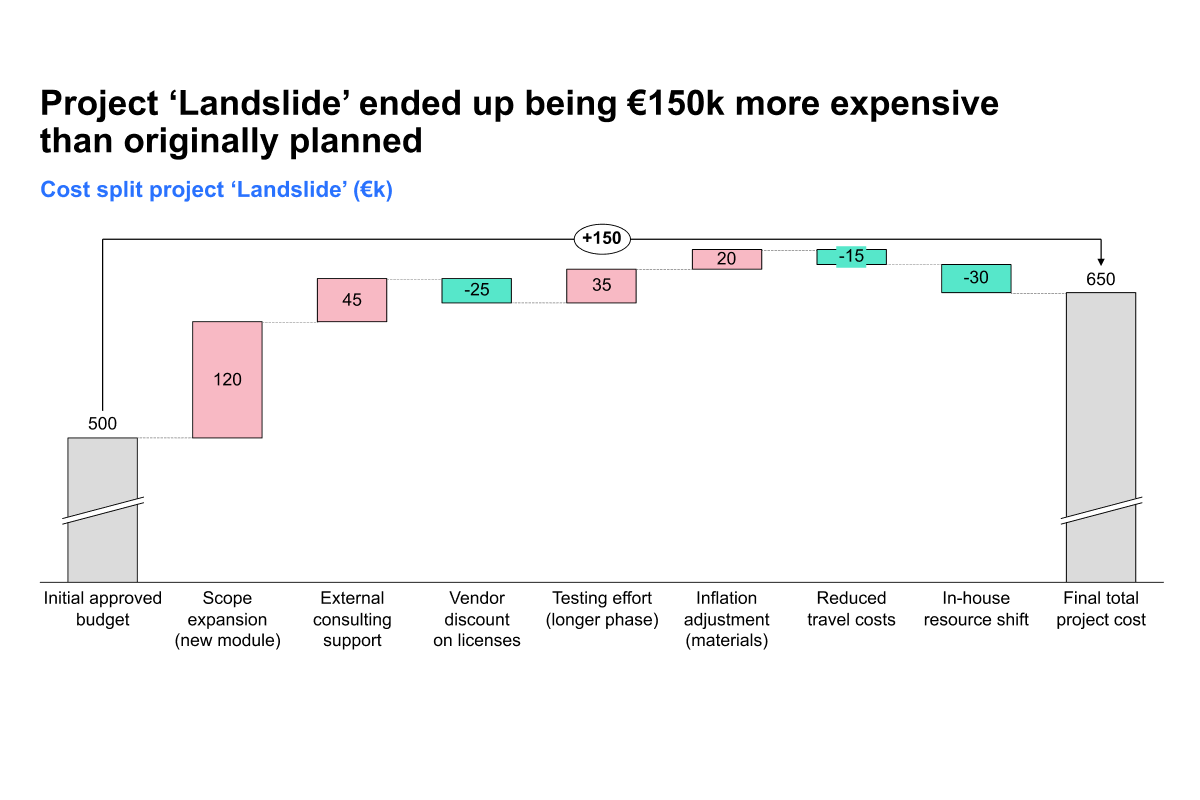
By the end of this course, you will know how to clearly present the full cost of a project using thinkcell’s waterfall charts. You will build a clean, step-by-step cost breakdown that communicates total spend, key components, and cost drivers with precision and clarity.

  • Cost breakdown with build-up waterfalls: Learn how to use a build-up waterfall to show how each cost contributes to the total. Make your data easy to follow by walking your audience through each stage of the project budget.
  • Editing the data sheet: Understand how to structure and edit the data sheet behind your chart for smooth updates, accurate totals, and consistent formatting.
  • Calculating totals and adjusting colors: Automatically calculate total values and apply color coding to separate positive, negative, and neutral values for quick visual clarity.
  • Customizing labels and arrows: Refine your chart by customizing data labels for clarity and adding total difference arrows to show key changes between starting and ending values.
  • Creating chart variations: Explore how to create multiple tailored versions of the same chart.

These techniques will help you build executive ready cost visuals that are both informative and easy to understand, whether you are sharing a project proposal, budget review, or financial summary.


Curriculum25 min

  • Introduction & key concepts
  • Download: PowerPoint and Excel files
  • Introduction 4 min
  • Building the chart
  • Calculating totals 4 min
  • Adjusting colors 4 min
  • Customizing data labels 3 min
  • Adding total difference arrow 5 min
  • Exploring alternative visuals 5 min
  • Completion
  • Complete course 1 min

About this course

By the end of this course, you will know how to clearly present the full cost of a project using thinkcell’s waterfall charts. You will build a clean, step-by-step cost breakdown that communicates total spend, key components, and cost drivers with precision and clarity.

  • Cost breakdown with build-up waterfalls: Learn how to use a build-up waterfall to show how each cost contributes to the total. Make your data easy to follow by walking your audience through each stage of the project budget.
  • Editing the data sheet: Understand how to structure and edit the data sheet behind your chart for smooth updates, accurate totals, and consistent formatting.
  • Calculating totals and adjusting colors: Automatically calculate total values and apply color coding to separate positive, negative, and neutral values for quick visual clarity.
  • Customizing labels and arrows: Refine your chart by customizing data labels for clarity and adding total difference arrows to show key changes between starting and ending values.
  • Creating chart variations: Explore how to create multiple tailored versions of the same chart.

These techniques will help you build executive ready cost visuals that are both informative and easy to understand, whether you are sharing a project proposal, budget review, or financial summary.


Curriculum25 min

  • Introduction & key concepts
  • Download: PowerPoint and Excel files
  • Introduction 4 min
  • Building the chart
  • Calculating totals 4 min
  • Adjusting colors 4 min
  • Customizing data labels 3 min
  • Adding total difference arrow 5 min
  • Exploring alternative visuals 5 min
  • Completion
  • Complete course 1 min