
- Introduction & key concepts
-
Download: PowerPoint file
-
Introduction 3 min
- Building the chart
-
Customizing chart visuals 4 min
-
Adding analysis 4 min
-
Formatting forecasted data 3 min
-
Final touches 4 min
- Completion
-
Complete course 1 min
Track revenue growth
Course 1 of 6 in Project Management
Learn how to effectively track revenue growth
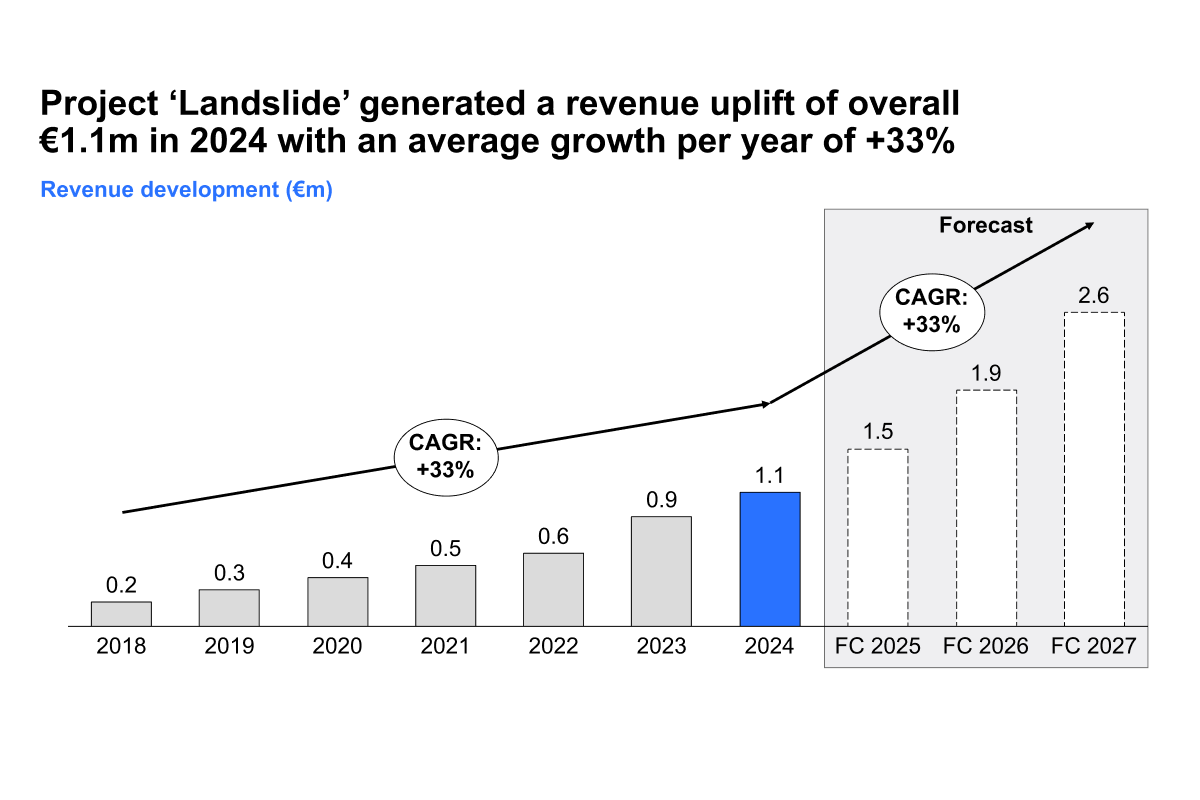
By the end of this course, you’ll know how to track revenue trends, explore forecasts for future periods, and present your data in clear, compelling slides using thinkcell. You’ll gain the skills to turn complex figures into meaningful, easy to understand insights.
- Dynamic revenue analysis: Learn how to visualize revenue over time using thinkcell’s advanced chart types. Combine actuals, forecasts, and targets into a single, easy to read chart that highlights performance clearly.
- Powerful in-slide calculations: Use thinkcell’s calculate functions to automate growth rates, year over year comparisons, and cumulative totals. Eliminate manual errors and save time while ensuring consistent results.
- Visual storytelling with impact: Apply layout, labeling, and design techniques that make your charts not just informative but also visually engaging. Create presentations that are easy to follow and resonate with decision makers.
These techniques will help you communicate revenue performance with clarity, precision, and confidence.